Set up
The Mac first, then the tablet. The easiest way is to set it up with AI. This page is the step by step way.
What you need
Two things. Everything else is optional, and anything you don't have simply stays quiet.
A Mac at home that stays on
The Mac runs everything: the screen, the aircon and music controls, the voice, and the calendars on each person's card. It checks the calendars every 10 minutes, so if the Mac sleeps or is turned off, nothing updates and the tablet says the hub isn't answering until it's back.
macOS 14 or newer, left on and not asleep. Windows and Linux aren't supported.
An Android tablet
Android 11 or newer, in landscape, on the same Wi-Fi as the Mac. The screen is made for 1280 by 800 and scales to others.
There is no iPad app, and it doesn't run on a phone.
Optional, add any time
- AirTouch 5 aircon
- Rooms, vents, mode and temperature.
- Google Cast speakers
- Spotify on the speakers. Spotify Premium to move music between them and play by name.
- TVs with couch-tv
- Power, apps and volume for each TV.
- A Claude plan
- For questions the simple rules don't cover. It never uses an API key.
Built for one house: 7 aircon rooms, 3 speakers and 3 TVs. A different house changes one file, and setting it up with AI does that with you.
On the Mac
Seven steps, plus voice and Spotify if you want them. Open Terminal (press Command and Space, type Terminal, press Return). Paste each line, press Return, and wait for it to finish before the next.
Get Apple's developer tools
A window opens: click Install and wait for it to finish. If it says they're already installed, carry on.
xcode-select --install
Check the Mac has Python
It needs Python 3.11 or newer. If this shows 3.9 or an error, install Python from python.org, then close Terminal, open it again and check once more.
python3 --version
Get home hub
This downloads it into a folder called home-hub in your home folder.
cd ~ && git clone https://github.com/Seagey/home-hub.git && cd home-hub
Install what it needs
This stays inside the home-hub folder.
python3 -m venv hub/.venv
hub/.venv/bin/pip install -r hub/hubserver/requirements.txt -r hub/homemcp/requirements.txt
Name your rooms, speakers and TVs
This makes your own settings file, then opens it. Change the names to the ones you say out loud, and the people who get a card (first names only). Save and close it. It is set up for 7 aircon rooms, 3 speakers and 3 TVs: a different number means changing
hub/contract.pytoo, which the AI path does with you.mkdir -p ~/.home-hub && chmod 700 ~/.home-hub cp config.example.json ~/.home-hub/config.json && open -e ~/.home-hub/config.json
Start the hub
It starts now and every time you log in, and checks that it answers.
sh hub/deploy/install.sh
Have a look
The wall screen opens on the Mac. Check your devices show up.
sh hub/deploy/open-wall.sh
Voice Optional
To talk to it. If you don't have Homebrew, the first line installs it (it asks for your Mac password). The last line downloads the speech model, about 470 MB. Without these, everything but voice works.
/bin/bash -c "$(curl -fsSL https://raw.githubusercontent.com/Homebrew/install/HEAD/install.sh)"
brew install ffmpeg whisper-cpp
mkdir -p ~/.home-hub/models && curl -L -o ~/.home-hub/models/ggml-small.en.bin https://huggingface.co/ggerganov/whisper.cpp/resolve/main/ggml-small.en.bin
Spotify Optional
On the Mac, open this address in a browser and follow the page. It walks you through making a free Spotify app and linking your account. Spotify Premium is needed to move music between speakers.
open http://127.0.0.1:8790/spotify/login
On the tablet
Any Android tablet on Android 11 or newer, on the same Wi-Fi as the Mac. No cables and no developer settings.
Download the app
Open this page on the tablet and tap the button, or scan the code with the tablet's camera.
Download the apphome-hub-tablet.apk, 7.5 MBShort address to type on the tablet:
Scan with the tablet
Install it
Open the download. If Android asks, allow your browser to install apps (Settings shows the switch), then tap Install. If Play Protect says it doesn't know the app, tap More details, then Install anyway.
Open Home
The app is called Home. It may ask to use the microphone: that's for holding the button to talk. If Android asks which Home app to use, pick Home to bring the wall back with the Home button, or keep your usual one.
Connect it to the Mac
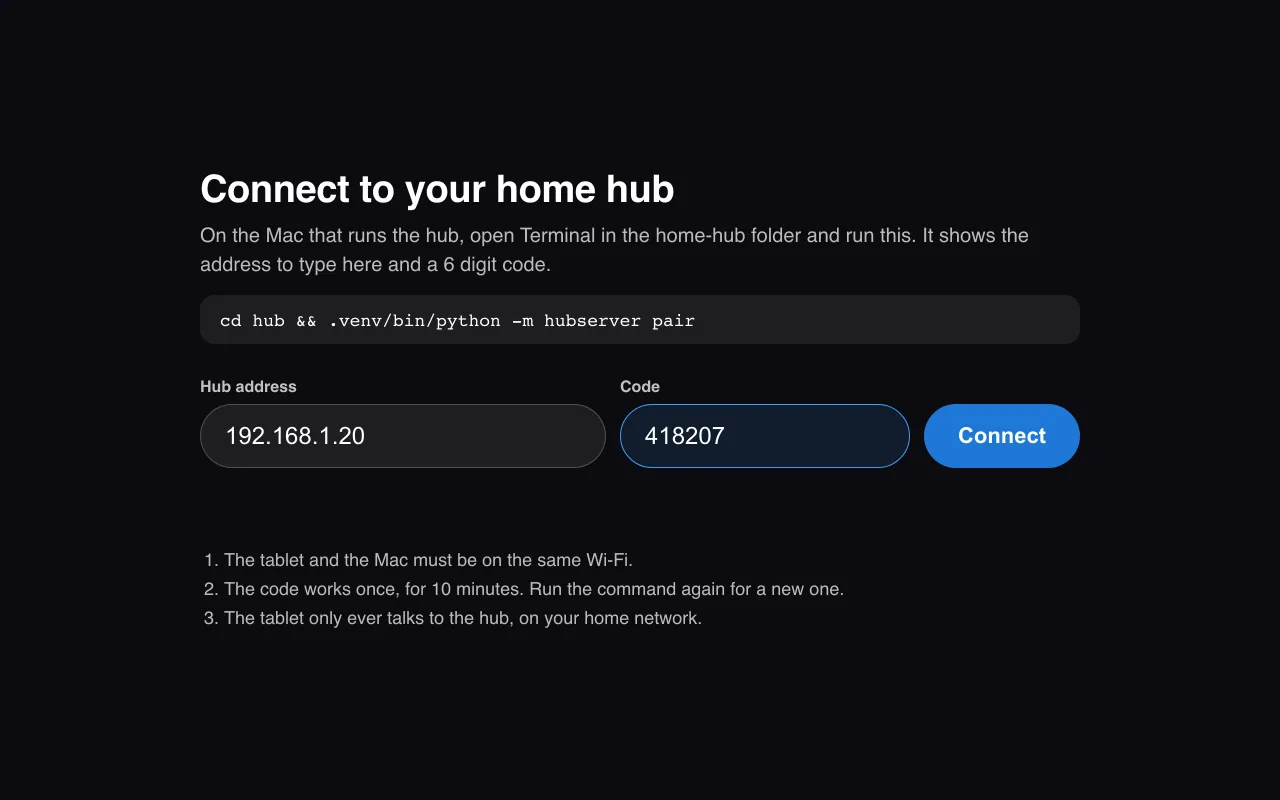
On the Mac, in the home-hub folder, run this. It shows the Mac's address and a 6 digit code. Type both on the tablet and tap Connect. The code works once, for 10 minutes.
cd ~/home-hub/hub && .venv/bin/python -m hubserver pair
Extras, any time
Each one is optional and can be added any time.
A calendar on someone's card
Copy the calendar's private iCal address (Google Calendar: Settings, the calendar, Integrate calendar). Run this with their name, then paste the address. It isn't shown as you paste.
cd ~/home-hub/hub && .venv/bin/python -m hubserver calendar Sam --label Family
Face ID
On the tablet, tap your name, then Set up face. Stand about an arm's length away and look at the screen for a few seconds. Each person sets up their own. Forget my face removes it.
Claude for questions
Install Claude Code on the Mac and sign in with your Claude plan. Questions the simple rules don't cover then go to Claude. Home hub never uses an API key.
- Stuck? The full instructions are in the README. Or let an agent finish it with you: Set up with AI.

Shout Josh a coffee
Home hub is free and open source. Josh builds it in his own house after work. If it runs yours, a coffee keeps the next thing coming.